Guides
AI Automation for Small Business: A Practical 2026 Guide
A practical guide to choosing, testing, and measuring small-business AI automation without handing over more access or judgment than the job requires.

AI automation can help a small business process routine work faster, but the best place to start is not “automate everything.” Start with one repeated job that has clear inputs, a visible finish line, and a mistake you can catch before it reaches a customer.
That might be preparing a morning inbox brief, drafting follow-ups for new leads, turning meeting notes into assigned tasks, or comparing this week's numbers with last week's. The useful question is not whether AI can touch the task. It is whether the whole workflow can become more reliable without creating a larger review problem for you.
This guide shows how to make that decision, choose the right kind of automation, and run a controlled first month.
What AI automation actually means
“AI automation” is used for several different things. Separating them makes buying and setup decisions much easier.
Rules-based automation
A conventional automation follows instructions you define in advance: when a form is submitted, create a contact; when an invoice becomes overdue, send an internal reminder. It is predictable and often the best answer when the same input should always produce the same action.
Use it for exact routing, copying data between fields, scheduled notifications, and calculations. You do not need an AI model to move a known value from one system to another.
AI-assisted automation
AI becomes useful when the workflow must interpret language or messy information. It can categorize an email by meaning, extract details from a document, summarize a long thread, or draft a reply from source material.
The surrounding workflow may still be fixed. For example: a support email arrives, AI classifies it, the system routes it to the correct queue, and a person reviews the suggested reply.
Agentic automation
An AI agent can choose among permitted tools and work through several steps toward a goal. Instead of following one rigid path, it can gather context, decide which approved action comes next, check the result, and stop when the job is complete or it needs a decision.
An agent might receive a new lead, check whether the contact already exists, research the company from approved sources, draft a tailored reply, update the CRM, and schedule a reminder. The OpenAI business guide to working with agents describes the same core ingredients in broader terms: a model reasons about the work, tools let it act, and instructions and controls shape what it may do. See OpenAI's business leader's guide to agents.
More flexibility also creates more ways to be wrong. Use an agent when the workflow genuinely needs judgment across steps—not because “agent” is the newest label.
Start with a job, not a tool
Buying a platform before choosing the job often creates a month of demos and no finished work. Begin with a sentence that describes the result:
Every weekday by 8 a.m., prepare a brief of new customer messages that need my decision, with a draft response beneath each one. Do not send anything.
That sentence identifies the schedule, source, output, audience, and permission boundary. “Help with my inbox” does not.
Write down how the job works today before changing it:
- What starts the work?
- Which information is required?
- Which systems does someone open?
- What decisions occur along the way?
- What does a correct result look like?
- Who notices a mistake, and when?
If nobody can explain the current process, automation will not make it clearer. It will make the ambiguity run faster.
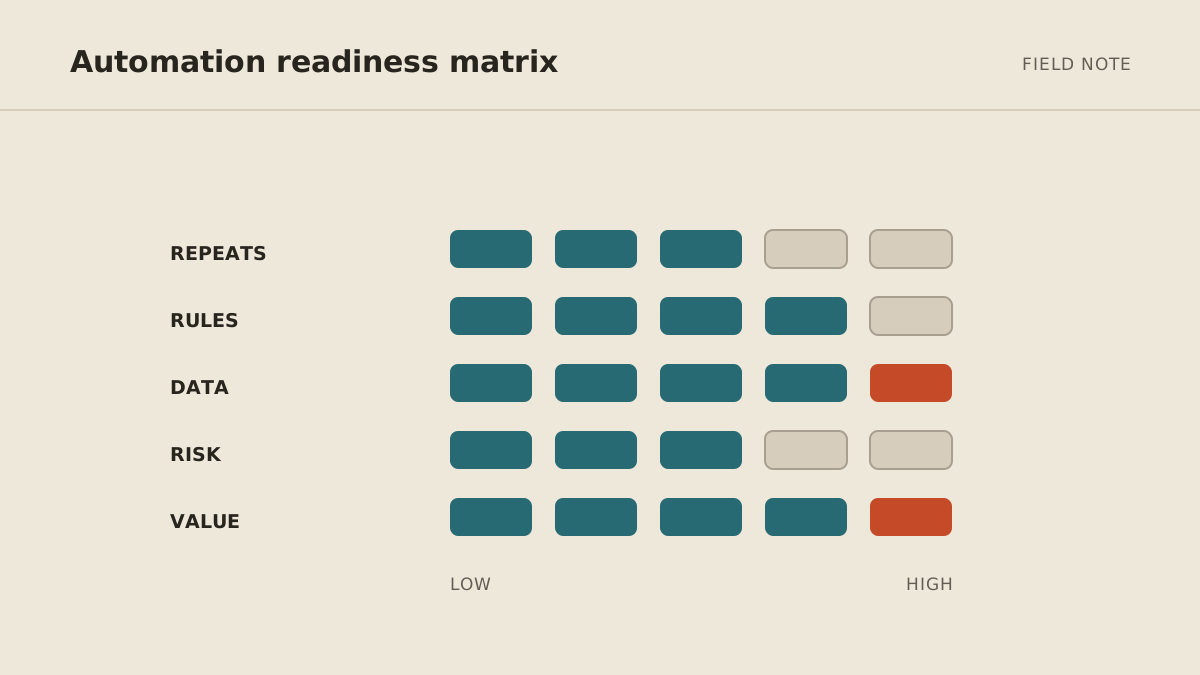
A five-part automation readiness score
Score a possible first workflow from 0 to 2 on each factor. The maximum is 10.
| Factor | 0 | 1 | 2 |
|---|---|---|---|
| Frequency | Occasional | Monthly | Weekly or daily |
| Clarity | Depends on unwritten judgment | Some rules are clear | Inputs and finish line are explicit |
| Digital inputs | Mostly calls, memory, or paper | Some usable digital data | Inputs already live in accessible tools |
| Reviewability | Errors are hard to spot | A sample can be checked | Every output is quick to verify |
| Consequence | A mistake is costly or irreversible | Moderate impact | Low-impact and easy to undo |
A score of 8–10 is a strong first candidate. A score of 5–7 may work after you simplify the process or add an approval. Below 5, improve the workflow before automating it.
The score is a filter, not a guarantee. A frequent task can still be a bad first project if it handles sensitive records or sends commitments without review.
Good first automations for a small business
The strongest first jobs remove preparation and coordination rather than consequential judgment.
- Inbox or request triage: group incoming items, flag likely urgency, and show the original source beside the summary.
- Meeting preparation: assemble the agenda, recent correspondence, open tasks, and questions from approved sources.
- Follow-up drafting: prepare a draft when a lead or client conversation goes quiet, then wait for approval.
- Document intake: extract named fields, flag missing information, and route the document without deciding whether it should be approved.
- Weekly reporting: gather the same measures, explain material changes, and link back to the underlying numbers.
- Source monitoring: check a defined set of public pages and report only what changed.
Browse the 15-task opportunity map if you need ideas. Choose one, not five.
Decide what the system may do
Every action belongs in one of three groups: act, ask, or never.
Act is for bounded, reversible work: read a specified folder, categorize messages, prepare a private draft, or update a noncritical working field.
Ask is for actions that affect another person, money, public information, or an important record: send an external email, reschedule a client meeting, issue a refund, publish a post, or replace CRM data.
Never covers access the job does not require: unrestricted password-vault access, financial transfers, deletion of backups, or a personal inbox unrelated to the workflow.
These boundaries should be enforced with tool permissions and approval steps, not left entirely to a prompt that says “be careful.” OWASP's AI Agent Security Cheat Sheet recommends minimum necessary tool access, explicit authorization for sensitive operations, human review for high-impact actions, monitoring, and limits on cost and retries.
Read the full business-tool safety guide before connecting an agent to live systems.
Measure the work before claiming time saved
Pick a normal two-week period and record four numbers:
- how often the task occurs;
- average hands-on minutes per run;
- how often rework is needed; and
- how long the work waits before someone starts it.
After automation, measure the same four numbers plus review time and exceptions.
A simple monthly estimate is:
(manual minutes per run × monthly runs) − AI review minutes − exception handling minutes
Suppose a weekly report takes 75 minutes four times a month. The automated version takes 15 minutes to review and needs one 20-minute correction per month. The illustrative saving is (75 × 4) − (15 × 4) − 20 = 220 minutes, or 3 hours and 40 minutes per month.
That is not a promise. Your baseline makes the estimate honest. Also measure quality: missing fields, incorrect routing, response delay, and owner interruptions may matter more than raw minutes.
A practical 30-day rollout
Week 1: map and test offline
Choose one workflow, write the finish line, gather 10–20 past examples, and mark what a good result would have been. Define act, ask, and never boundaries before connecting live tools.
Test the instructions against the historical set. Record failures by type: missing context, incorrect judgment, wrong format, or unsafe proposed action. A correction such as “try again” is not enough; update the rule or input that caused the failure.
Week 2: connect read-only access
Connect only the sources the job needs. Let the automation read and prepare outputs without changing records or contacting anyone.
Review every result. Confirm that summaries point back to their sources and that the workflow stops cleanly when information is missing.
Week 3: run in draft mode
Allow the workflow to prepare drafts, proposed updates, or suggested actions. A person approves the final step.
Track approval rate and edit distance. If most drafts need major rewriting, the workflow is not ready for more autonomy. If the same exception appears repeatedly, improve the instructions or route that case to a person.
Week 4: automate the low-risk step
Permit one proven, reversible action, such as applying an internal label, creating a draft, or adding a reminder. Keep consequential actions behind approval.
Schedule a weekly review of failures, permissions, usage, and whether the automation still saves time. Expansion is earned by dependable results, not by the number of integrations available.
How to choose between DIY and managed setup
A self-serve product is a good fit when the workflow is common, you enjoy configuring tools, and someone on the team will maintain it. A no-code platform makes sense when you need custom logic across familiar apps and are willing to monitor usage and changes.
A managed agent is useful when the workflow crosses several tools, needs persistent context, or should be maintained by someone outside your team. The higher monthly price pays for setup, operations, recovery, and tuning—not merely access to a model.
Compare the full expense in the small-business AI agent cost guide, then use the no-code setup playbook if you want to build the first version yourself.
The standard for a successful first automation
After 30 days, you should be able to answer five questions with evidence:
- Did the workflow finish the defined job?
- Did it reduce hands-on time after review and exceptions?
- Did quality stay the same or improve?
- Did it remain inside its access and approval boundaries?
- Does someone know how to pause, correct, and maintain it?
If the answer is yes, expand one adjacent step. If not, narrow the job. A small automation you can trust is more valuable than an impressive system you have to watch all day.
MyAgnts builds managed private operators around this same progression: one job, minimum access, explicit approvals, and expansion after the result is dependable. If recurring work is stealing time, book a setup call. No task prep is required; we will learn how the work happens and identify a bounded candidate together.