Ecosystem
Hermes Agent Hosting: Local, Self-Managed Server, or Managed
A practical Hermes Agent hosting guide covering deployment choices, prerequisites, runtime availability, access, and upkeep.

This guide answers where Hermes Agent can run and what each deployment requires. For the separate question of who should operate Hermes after setup, see our self-hosted versus managed comparison.
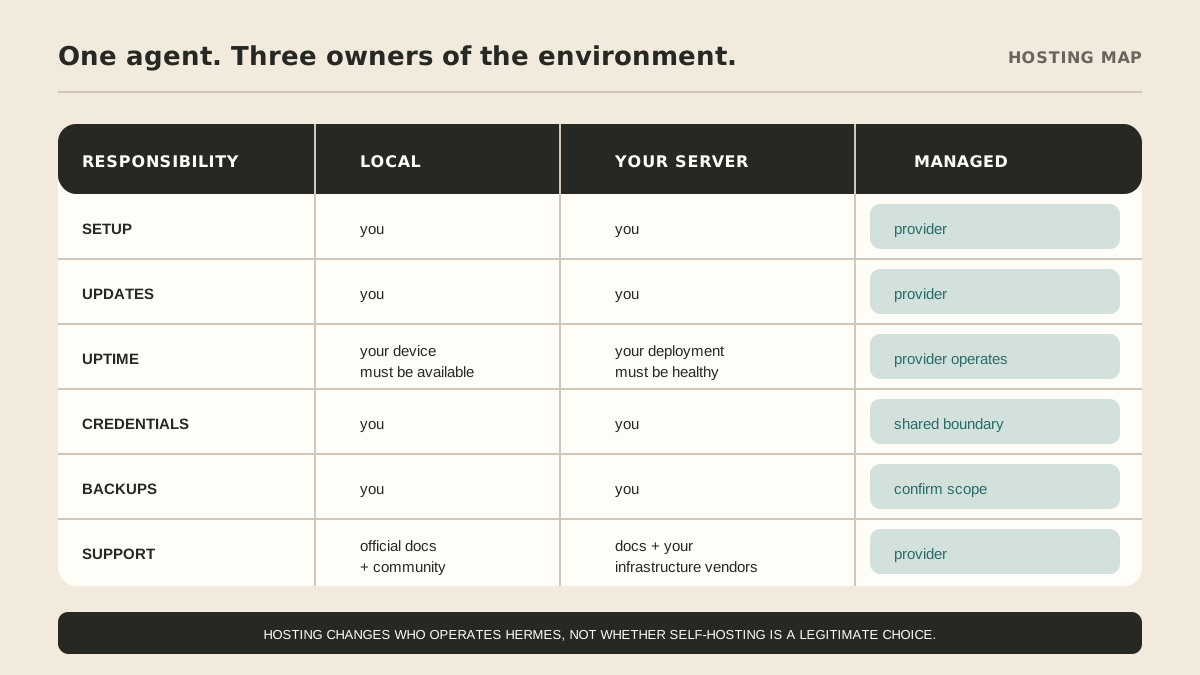
There are three practical deployment paths: run Hermes on your computer, keep it online on infrastructure you manage, or use a managed service that operates the environment for you. The agent can be useful in all three. The deployment choice changes availability, prerequisites, access, and upkeep—not the underlying Hermes capability.
Hermes product details here were checked against the official installation, quickstart, and tools documentation on September 5, 2026. The project changes quickly; confirm the linked pages before installing.
What does Hermes Agent need to run?
The official installation guide provides desktop and command-line paths for supported environments. The installer handles the runtime dependencies; on non-Windows platforms, Git is the main prerequisite, with additional system packages for some Linux and desktop setups.
After installation, the quickstart covers provider selection and verification. Depending on the job, the surrounding environment may also need:
- a machine available when the job should run;
- storage for configuration, sessions, memory, and skills;
- model and tool credentials or a supported portal login;
- the Hermes gateway when you want messaging channels;
- a schedule and delivery path for recurring work; and
- permission rules for what the agent may do.
The official docs describe commands such as hermes model, hermes tools, hermes gateway, hermes doctor, and hermes update. Hosting is the decision about where those commands and the persistent agent state live.
Hosting paths at a glance
| Deployment path | Setup and prerequisites | Runtime availability | Access owner | Review and upkeep | Cost shape |
|---|---|---|---|---|---|
| Your computer | Install Hermes, provider, and tools on a device you control. | Depends on the device being awake, connected, and available. | You manage local files, accounts, and credentials. | You test updates, check schedules, and handle exceptions. | Lower cash cost may still mean more owner time. |
| Your server or cloud account | Provision and harden a host, install dependencies, configure storage, and expose only needed services. | Depends on your deployment health and operating practice. | You manage infrastructure, network rules, credentials, and logs. | You own monitoring, updates, recovery, and vendor boundaries. | Infrastructure, usage, and operator time. |
| Managed service | Provider prepares the environment and agreed connections around a scoped workflow. | Defined by the provider’s published service scope; no uptime guarantee is implied here. | You approve minimum access; provider operates the managed environment. | Provider handles in-scope maintenance; you review the workflow and exceptions. | Published service fee plus any customer review or excluded tools. |
Option 1: Run Hermes on your computer
Local installation is the clearest way to learn Hermes. You can inspect the files, choose the provider, change tools, and update on your schedule without provisioning a separate server.
It is a strong fit when you are:
- evaluating Hermes before committing to a workflow;
- using it interactively while you are at the computer;
- developing skills or integrations; or
- comfortable managing local credentials and state.
The trade-off is availability. If the computer sleeps, loses its connection, or travels with you, unattended work may not run when expected. Local use also leaves updates, diagnostics, access cleanup, and recovery procedures with you.
Option 2: Run Hermes on a server you manage
A VPS, dedicated server, container platform, or supported cloud environment can separate Hermes from your laptop for messaging or scheduled work. The official project documentation discusses local, Docker, SSH, and cloud-oriented approaches.
You choose the host, region, model provider, network rules, storage, deployment method, and observability. You also become responsible for:
- provisioning and hardening the machine or container;
- installing system and browser dependencies;
- keeping credentials out of images and logs;
- configuring the gateway and channel allowlists;
- monitoring process, disk, network, and scheduled-job health;
- applying Hermes and dependency updates; and
- restoring service when an update or connection fails.
Hermes provides official diagnostics and update workflows. Those tools help you operate the deployment; they do not transfer the responsibility to someone else.
Choose this path when remote availability and infrastructure control are worth owning. Use the self-hosted versus managed comparison for the deeper cost and responsibility decision.
Option 3: Use a managed Hermes service
A managed service runs Hermes inside an environment the provider provisions and maintains. “Managed” is not one standard bundle, so ask what setup, connections, model usage, updates, support, review, retention, and exit include.
MyAgnts currently lists Private Operator at $500/month. The published offer includes personal setup, AI usage with no separate model account, approved connections for messages, calendars, files, websites, and tools, persistent memory on encrypted storage, monthly workflow review and tuning, and priority support. Customers still define the workflow, access, and actions that require review. Confirm fit and scope on the pricing and managed service pages.
This path is a fit when you want recurring work handled without becoming the person who installs, updates, diagnoses, and maintains the stack. It is not the right fit if you need root-level control, want to modify the runtime freely, or only use Hermes occasionally.
How should you choose a deployment path?
Use the local path to learn. Move to your own server when you can name the reason you need remote availability and are prepared to own the runtime. Consider managed when the recurring result matters more to you than administering the infrastructure.
Ask five deployment questions:
- Must the agent work while my computer is off?
- Do I want to manage provider accounts, channel tokens, updates, and recovery?
- Do I need complete infrastructure control?
- Who will inspect a failed scheduled job and decide what happens next?
- Which state, credentials, and workflow records need an exit or migration path?
If you want hands-on control, follow the official Hermes installation guide and begin locally. If you are comparing agent stacks, read Hermes Agent vs. OpenClaw. If you want managed operation, review the MyAgnts managed service, pricing, or book a setup call. No task prep is required; we will learn how the work runs and identify a practical candidate.