Comparisons
Lindy vs Relevance AI vs Managed Agents
Compare Lindy, Relevance AI, and a managed AI agent by workflow fit, setup ownership, recurring work, controls, pricing, and maintenance.
Lindy is the clearest fit for a company that wants an assistant-shaped product for email, meetings, scheduling, and follow-through. Relevance AI is the stronger fit for an internal builder who wants to design custom agents and multi-agent workforces. A managed AI agent fits a business that wants one recurring workflow implemented and maintained by a provider instead of operating another platform.
Disclosure: MyAgnts publishes this comparison and sells the managed service discussed below. We do not use affiliate links. Lindy and Relevance AI can be better choices when their self-service operating model fits the buyer.
Product features and pricing change. The claims below were checked against Lindy’s official product page, Lindy’s pricing documentation, and Relevance AI’s pricing documentation on August 31, 2026.
The short answer
Choose Lindy when the work resembles a shared assistant role and your team is willing to configure its connections, routines, memory, and approval settings.
Choose Relevance AI when you want a flexible no-code environment for custom agents, tools, schedules, escalations, and workforces—and someone internally will own the build.
Choose a managed agent when the workflow is valuable and recurring, but platform configuration, testing, maintenance, and recovery are not work you want to own.
Do not choose by the word “employee.” Write down one trigger, one finish line, the systems involved, and the actions that require approval. Then compare how each option handles that job.
Comparison at a glance
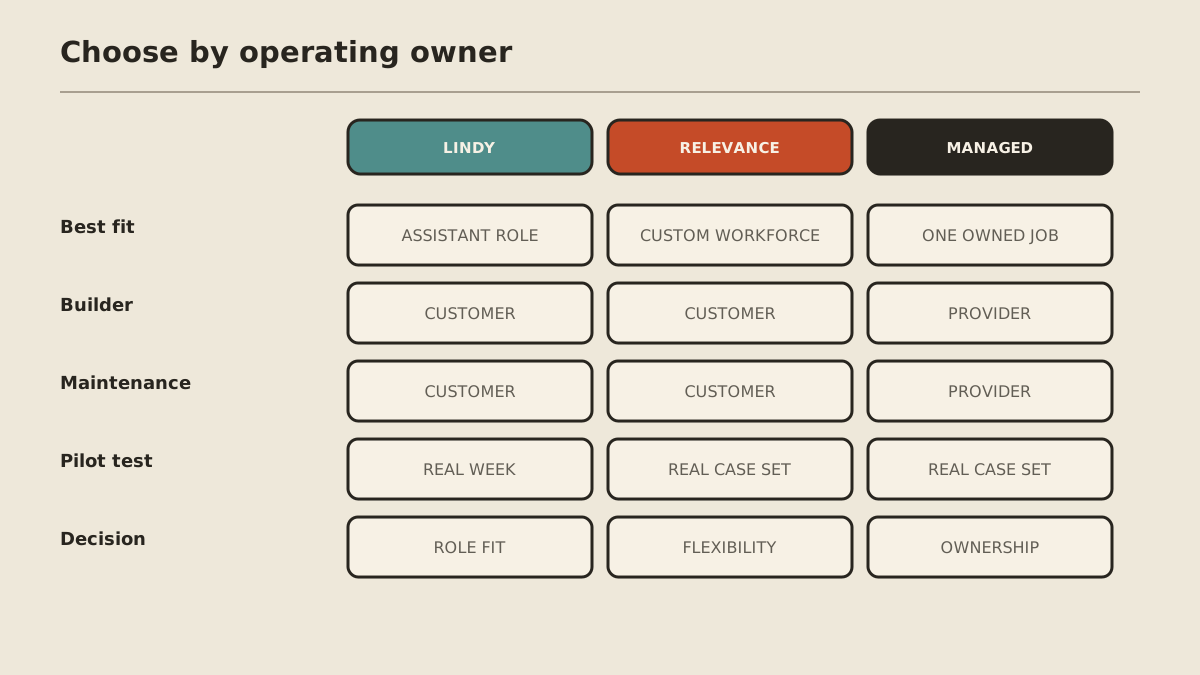
| Criterion | Lindy | Relevance AI | Managed agent |
|---|---|---|---|
| Best starting point | Assistant-shaped work across inboxes, meetings, calendars, and team tools | Custom agents and coordinated workforces | One defined recurring business result |
| Builder | Customer configures the role | Customer designs agents, tools, and tests | Provider implements the agreed workflow |
| Recurring work | Scheduled routines and ongoing workspace context | Scheduled tasks, triggers, escalations, and task history by plan | Agreed schedule or event within service scope |
| Integrations | Product says 1,000+ integrations plus MCP | Documentation says 2,000+ apps plus custom APIs | Only the minimum approved connections required for the job |
| Approval model | Outside-impact actions wait for approval, according to Lindy’s docs | Builder configures tools, escalations, and plan-dependent controls | Customer and provider define act, ask, and never boundaries |
| Pricing shape | Per user plus shared credits | Subscription plus actions and vendor credits | Service fee plus customer review and excluded tools |
| Maintenance owner | Customer | Customer | Provider within the written scope |
Lindy: a product shaped like a teammate
Lindy starts closer to a recognizable assistant than a blank workflow canvas. Its official product page describes scheduled routines, connected team tools, meetings, editable memory, reusable skills, and work through Slack, iMessage, Gmail, and the browser.
That product shape matters. If the job is “prepare my day, watch the inbox, capture meetings, draft follow-ups, and assemble a Friday report,” Lindy gives the buyer a coherent place to begin.
It does not remove operating responsibility. Your team still decides:
- which accounts and channels it may access;
- which context belongs in shared or personal memory;
- which routines should run automatically;
- which actions must wait for approval;
- how incorrect drafts and missed edge cases become better instructions;
- who watches usage and removes access when the role changes.
Lindy’s official pricing documentation uses per-user plans with a shared credit pool. Larger jobs consume more credits, and paid seats add to the workspace allocation. That makes the real cost a combination of seats, credits, connected inbox requirements, and the time spent reviewing and improving the role.
Best fit: a small team wants a broad assistant experience and has a clear internal owner.
Poor fit: the company wants a deeply custom multi-agent system or expects the vendor to design and maintain a bespoke workflow on its behalf.
Relevance AI: a platform for custom agent systems
Relevance AI starts from a different premise. Its official site and documentation focus on specialist agents, tools, knowledge, integrations, triggers, evaluations, and coordinated workforces.
That flexibility is useful when one agent is not enough. A builder might create a research agent, an enrichment agent, a meeting-prep agent, and a follow-up agent, then define how work moves between them.
The tradeoff is straightforward: flexibility creates design work. Someone must own:
- agent responsibilities and handoffs;
- tool and data access;
- test cases and evaluation criteria;
- schedules and escalation paths;
- model and vendor-credit choices;
- failed runs, changing schemas, and workflow revisions.
Relevance AI’s pricing documentation separates Actions from Vendor Credits. Paid tiers add scheduling, escalations, more history, analytics, and other controls. A cheap entry plan can support exploration, but production cost should include action volume, model usage, top-ups, and builder time.
Best fit: an operations or technical owner wants to build several custom agents and keep control of the system.
Poor fit: nobody wants to become the agent-platform operator after the initial demo.
Managed agent: buy operating ownership, not a bigger feature list
A managed agent is a service model rather than one universal product. The provider and customer define a workflow, connect the minimum required systems, test real cases, set approval boundaries, and keep the operating environment working.
For MyAgnts, the current offer is one recurring, primarily digital workflow for $500 per month, as described on the pricing page. MyAgnts handles implementation and the managed environment. The customer still owns the goal, business rules, exceptions, and consequential approvals.
The important question is not whether a managed service has more integrations than Lindy or Relevance AI. It is whether the provider will take responsibility for the exact job you need, document what remains out of scope, and maintain it after launch.
Best fit: a useful recurring workflow exists, but the buyer does not want to configure and operate a platform.
Poor fit: the work is occasional, the process is still undefined, deep infrastructure control is required, or an internal builder actively wants to own the system.
Compare the control models
“Autonomous” is not the same as uncontrolled. Compare the actual boundaries.
For Lindy, verify the specific accounts, channels, approval behavior, and routine settings used by the role. Its documentation says actions with outside impact wait for approval, but you should still test the exact message, record update, or publication path involved.
For Relevance AI, inspect tools, triggers, task history, escalations, analytics, evaluations, and enterprise controls at the plan you are considering. A capability listed at another tier is not part of your control model.
For a managed provider, ask for a written map:
- Act: low-risk steps the agent may complete without interruption.
- Ask: consequential, ambiguous, or externally visible actions requiring approval.
- Never: prohibited systems, data, and actions.
A provider relationship is not a substitute for controls. It should make ownership clearer.
Run one real-week pilot
Do not compare polished demos. Give each finalist the same representative work.
- Select 15 to 30 historical cases, including awkward and incomplete ones.
- Define the correct result and the cases where the system should stop.
- Connect only the tools needed for the pilot.
- Run the job for a real week or a realistic replay.
- Record completion quality, correction time, approval burden, failures, and usage.
- Estimate monthly maintenance after the pilot, not just setup time.
For Lindy, test the complete assistant week. For Relevance AI, test the full agent chain and its failure paths. For a managed service, test whether the provider’s scope and response process actually remove operating work.
The decision rule
Pick Lindy when a teammate-shaped product matches the role. Pick Relevance AI when building a custom agent workforce is itself a capability you want to own. Pick a managed agent when the outcome matters more than owning the platform.
If you are still comparing the wider category, use the best AI agent platforms for small business guide. If managed ownership sounds closer to the job, review the managed AI agent service or book a 15-minute workflow call. You do not need to prepare a task; the call is used to understand how you work and identify whether there is a practical candidate at all.