Guides
How to Evaluate a Managed AI Agent: 12 Questions to Ask
Evaluate a managed AI agent with 12 practical questions about finished work, approvals, data access, maintenance, costs, support, and offboarding.

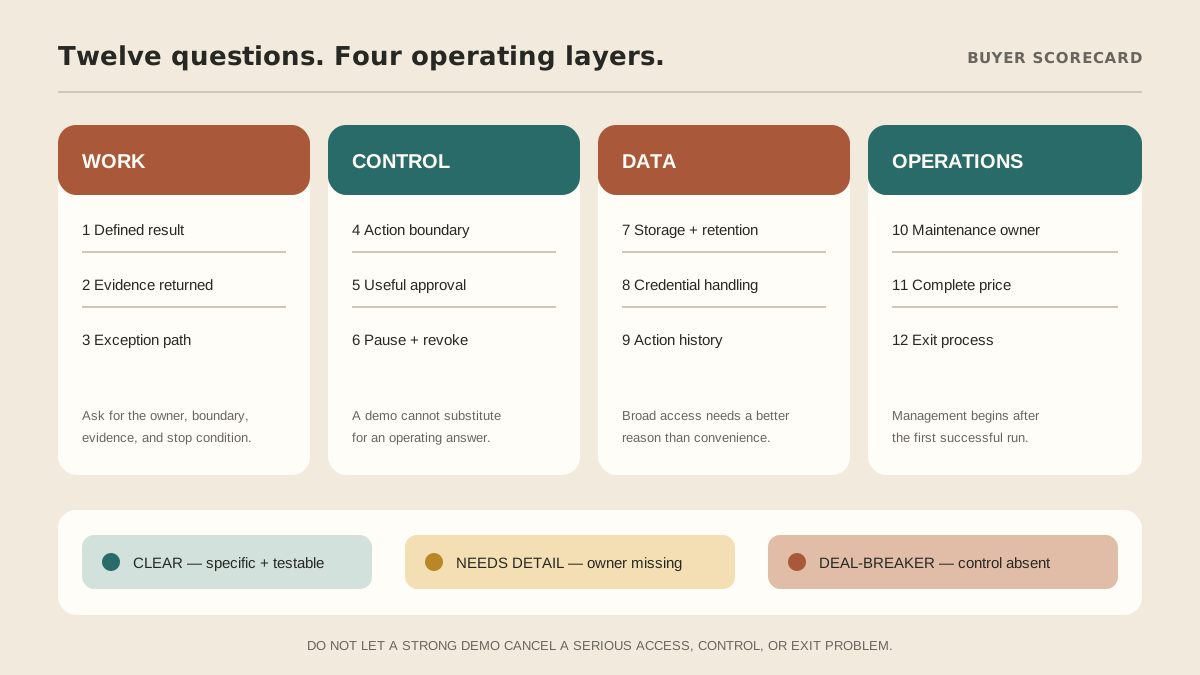
To evaluate a managed AI agent, ask for specifics in four areas: the work it will finish, the control you retain, the data and accounts it can reach, and who keeps the system working after launch. A polished demo is not enough. You need clear answers about one real workflow, including failure, approval, and exit paths.
Use the twelve questions below in a sales call or pilot review. A credible provider should welcome them.
Work: can it finish a defined job?
1. What exact result will the first workflow deliver?
A strong answer sounds like: “When an approved inquiry arrives, the agent checks these two sources, prepares a reply in this queue, and flags missing information for the account owner.” The trigger, sources, finish line, and exclusions are visible.
Warning sign: broad promises such as “handle operations” with no first job you can test.
2. What evidence comes back with the result?
A strong answer sounds like: the output links to source records, identifies actions taken, and separates facts from uncertain conclusions. You can check important work without reconstructing the whole run.
Warning sign: a confident answer with no source trail, action history, or indication of uncertainty.
3. What happens when the normal process breaks?
A strong answer sounds like: exceptions stop at a named boundary, appear in a visible queue, and go to a person with enough context to decide. Failed and “nothing changed” runs are reported differently.
Warning sign: endless retries, silent failures, or an agent that improvises beyond the approved job.
Control: who decides before an action lands?
4. Which actions can the agent take, prepare, or only suggest?
A strong answer sounds like: the provider can map each step to three clear modes: act within a narrow boundary, prepare for review, or ask before proceeding. Read, draft, send, publish, purchase, and delete are treated as different permissions.
Warning sign: one blanket “autonomous” setting for every tool. Our approval-boundary guide shows a practical way to separate these modes.
5. What does an approval show me?
A strong answer sounds like: the approval includes the exact recipient or record, proposed change, source context, consequence, and any amount involved. The reviewer knows what the button will do.
Warning sign: an abstract “approve action” prompt with no concrete before-and-after state.
6. How do I pause the workflow and revoke access?
A strong answer sounds like: a named person can stop schedules, disable tools, revoke tokens, and confirm that pending actions will not run. The process works without waiting for a developer to change code.
Warning sign: the provider can add access quickly but cannot explain removal just as clearly.
Data and access: what can the system reach?
7. Where do my data, memory, and logs live?
A strong answer sounds like: the provider names the environment, what persists, how customers are separated, what is logged, how long records remain, and how deletion works. “Private” is backed by an operating design.
Warning sign: “enterprise-grade security” with no plain-language account of storage, isolation, retention, or access.
8. How are credentials handled?
A strong answer sounds like: passwords and tokens stay out of ordinary chat, access uses the narrowest practical scope, and sessions can be revoked. The first rollout can begin with read-only or draft-only access where possible.
Warning sign: instructions to paste passwords, recovery codes, or long-lived keys into a prompt. See the business-tools security checklist before connecting live accounts.
9. Can I inspect what the agent did?
A strong answer sounds like: you can see the trigger, tools used, records changed, messages prepared or sent, approvals, retries, failures, and safe usage details without exposing secrets in the logs.
Warning sign: only a chat transcript. A transcript does not prove which external actions occurred.
Operations: who owns the system after the demo?
10. Who maintains connections, instructions, and updates?
A strong answer sounds like: ownership is explicit. The provider explains who restores an expired connection, tests an update, reviews failures, and adjusts the workflow when your process changes.
Warning sign: “fully managed” until something breaks, followed by a support article and a do-it-yourself repair.
11. What does the price include?
A strong answer sounds like: setup, model usage, hosting, connected tools, support, maintenance, review time, limits, and possible overages are separated in writing. You can compare the total operating cost with another option.
Warning sign: a low headline fee that excludes the usage or human work required to keep the workflow useful. Use the full AI agent cost worksheet to compare like with like.
12. What happens when I leave?
A strong answer sounds like: the provider explains how to export useful records, remove agent access, end sessions, delete retained data, transfer workflow documentation, and confirm offboarding.
Warning sign: detailed onboarding and no exit process.
How should you score the answers?
Do not give every answer one point and let a good demo cancel a serious access problem. Sort responses into three states:
- Clear: specific, testable, and written down.
- Needs detail: plausible, but the owner, boundary, or evidence is still missing.
- Deal-breaker: the provider cannot scope access, show actions, stop the workflow, protect credentials, or explain exit.
Resolve every deal-breaker before a live connection. For the remaining questions, choose one pilot workflow and turn “needs detail” answers into written acceptance criteria. This follows the spirit of NIST's voluntary AI Risk Management Framework: manage risk through clear governance, measurement, and operating responsibility rather than treating trust as a label.
What MyAgnts should be able to answer
MyAgnts is a managed AI agent service, so this checklist applies to us too. Our current model gives each customer a private persistent environment, maps work into act, prepare, or ask boundaries, and includes setup, AI usage, maintenance, and support. The first conversation should still begin with a defined workflow and the access it genuinely needs.
Read what a managed AI agent includes, then use these twelve questions with any provider you are considering. If you want to test MyAgnts against the same standard, review the managed service or book a 15-minute setup call. No task or question prep is required; we will learn how you work and show where the service fits or does not.