Productivity
Time Blocking for Founders: A Practical Weekly System
Build a time-blocking system that protects focused work, contains admin, and still leaves room for the surprises that come with running a business.

Time blocking is the practice of giving important work a specific place on your calendar before the day fills up. For a founder, that usually means protecting a few hours for product, sales, writing, or planning, then containing meetings and administration in their own windows.
The goal is not a perfectly packed calendar. It is a week in which the work that moves the business forward no longer depends on finding spare time.
This guide gives you a practical time-blocking system, a sample founder schedule, and a way to recover when the day inevitably changes.
Why a to-do list is not enough
A to-do list answers what needs doing. It does not answer when, how long the work deserves, or what should lose when two priorities compete.
That ambiguity is expensive. You open the list, choose something approachable, check a message while a file loads, and spend the next hour responding to whatever arrived most recently. The important task stays visible but untouched.
Interruptions do more than consume the minutes they take. In a controlled office-work study, participants compensated for interruptions by working faster, but reported more stress, frustration, workload, effort, and time pressure. The researchers did not claim that every interruption has the same cost; their useful finding is that interrupted work changes both pace and experience. You can read the original University of California, Irvine study.
Time blocking reduces the number of choices you have to make in the middle of the day. The calendar has already decided that 9:00 to 10:30 is for the proposal, while email can wait until 11:00.
Time blocking, timeboxing, and day theming
These methods overlap, but they solve different problems:
- Time blocking reserves part of the calendar for a task or category of work.
- Timeboxing adds a hard stopping point. When the box ends, you stop or deliberately schedule another box.
- Day theming gives a whole day a dominant purpose, such as client delivery on Tuesday and business development on Thursday.
Most founders need a mix. Use themes to shape the week, blocks to protect the day, and boxes to stop open-ended work from expanding forever.
Build your founder schedule in five steps
Do this once a week, ideally before Monday morning. The first pass should take about 30 minutes.
1. Start with three outcomes, not a full task list
Write down the three results that would make the coming week worthwhile. Use outcomes you can recognize:
- send the revised proposal to the client;
- interview five customers and summarize the patterns; or
- ship the onboarding fix and watch the first ten sessions.
“Work on sales” is too vague to earn a block. “Draft and send five renewal proposals” gives the block a finish line.
If you have more than three weekly priorities, rank them. A calendar cannot protect everything equally.
2. Place fixed commitments
Add the things that truly happen at a set time: customer calls, payroll, a medical appointment, school pickup, or a launch.
Be honest about the time around them. A 30-minute client call may also need 15 minutes of preparation and 10 minutes for notes. Put that work on the calendar or it will quietly come out of another block.
This is also the moment to question recurring meetings. The meeting-overload guide includes a simple keep, shorten, replace, or remove audit.
3. Protect your best hours
Now schedule the hardest of your three outcomes during the hours when you usually think most clearly. For many people that is morning, but your own evidence matters more than a generic rule.
Start with one 60- to 90-minute focus block on three days of the week. That is enough to learn from without creating a calendar you will abandon.
Give each block one visible outcome:
Weak: Product work
Useful: Decide the onboarding sequence and write the first draft
Close the inbox, silence nonessential notifications, and keep a scrap note for unrelated thoughts. Capturing “reply to Maya” is less disruptive than switching tasks to do it.
4. Contain reactive work
Email, approvals, scheduling, expenses, and small customer requests are real work. Pretending they do not exist only makes the plan brittle.
Give reactive work one or two windows. For example:
- 11:00–11:30 a.m.: inbox and approvals
- 3:30–4:15 p.m.: follow-ups and administration
The rule is not “never check messages.” It is “do not let every message choose the next hour.”
If your role requires faster response, shorten the gap between check-ins rather than leaving the inbox open all day. A founder handling live support might use a 50-minute focus block followed by a 10-minute response window.
5. Add buffers and a shutdown
Leave at least one unclaimed block each day. Use it for work that ran long, a genuine urgent issue, or a short reset. If nothing breaks, the buffer becomes useful extra capacity.
Finish with a 10-minute shutdown:
- Capture unfinished work.
- Move it to a real future block or remove it.
- Check tomorrow's first commitment.
- Write the first action for tomorrow's focus block.
That last step makes it easier to begin. “Open customer notes and group objections” is a better starting instruction than “strategy.”
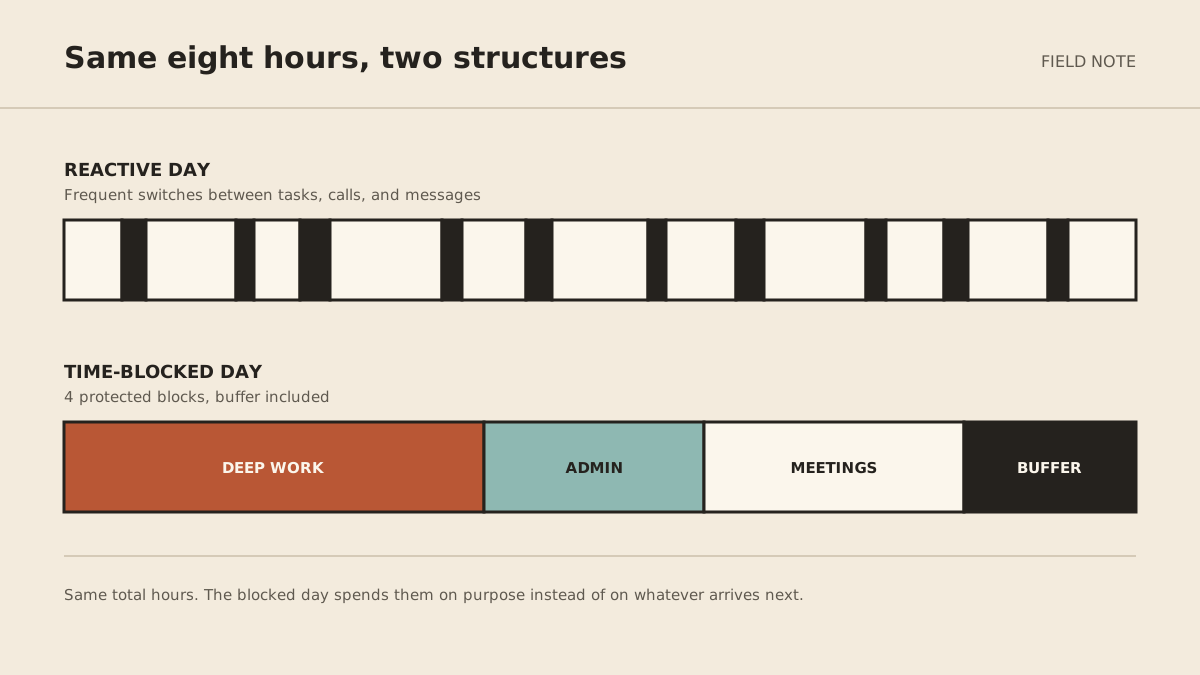
A sample time-blocked day for a founder
Use this as a starting point, not a schedule to copy:
| Time | Block | Intended result |
|---|---|---|
| 8:30–8:45 | Plan | Confirm today's one important outcome |
| 8:45–10:15 | Focus | Complete a defined product, sales, or writing deliverable |
| 10:15–10:30 | Buffer | Record next steps and reset |
| 10:30–11:00 | Inbox | Triage, approve, and schedule |
| 11:00–12:30 | Calls | Batch customer or team conversations |
| 1:30–2:30 | Delivery | Move active client or operational work forward |
| 2:30–3:00 | Buffer | Handle spillover or take a real break |
| 3:00–3:45 | Admin | Follow-ups, expenses, scheduling, and reviews |
| 3:45–4:00 | Shutdown | Re-plan unfinished work and prepare tomorrow |
If you spend most of the day serving customers, protect two smaller focus blocks instead. If your work is primarily creative, keep mornings open and batch calls into fewer afternoons. The test is whether the shape matches the work.
What to do when a block gets interrupted
A broken block is not a broken system. Use this recovery rule:
- Decide whether the interruption is truly urgent. Urgent means waiting creates a meaningful cost, not merely that someone asked quickly.
- If it can wait, capture it. Put it in the next reactive-work block.
- If it cannot wait, move the displaced work immediately. Give it a new calendar slot before handling the interruption.
- Leave a restart note. Write the next concrete action so you do not have to reconstruct your thinking later.
Do not “make up” every lost block by extending the workday. If interruptions repeatedly consume the same period, the schedule is telling you something. Shorten the block, move it, change your response promise, or create coverage.
Review the system every Friday
Look at the calendar you actually lived, not the one you planned.
Ask:
- Which protected blocks happened?
- What useful result came out of them?
- Which blocks were consistently too short?
- What interrupted them?
- Which recurring work should be stopped, simplified, automated, or delegated?
- What will I change next week?
Keep the review small. You are adjusting a working system, not grading yourself.
For repeatable administrative tasks, the solo-founder delegation guide helps you choose between software, a freelancer, a virtual assistant, and a managed agent. The first handoff should be easy to check and low risk when it goes wrong.
Common time-blocking mistakes
Scheduling every minute
A calendar with no slack treats normal variation as failure. Protect priorities and leave room for reality.
Using category names instead of outcomes
“Marketing” does not tell you how to start or finish. “Draft the July customer email and send it for review” does.
Giving shallow work your best hours
Inbox work feels productive because it offers quick closure. Schedule it deliberately, but do not automatically give it the part of the day when you do your best thinking.
Ignoring transition time
Calls need notes. Travel takes time. Focus needs a start-up period. Include those transitions when you estimate a block.
Rebuilding the system every day
A useful schedule has recurring anchors. Keep focus, inbox, meeting, and shutdown windows reasonably stable, then adjust the work inside them.
Time blocking FAQ
How many hours a day should I time block?
Start by protecting one 60- to 90-minute block on three days each week. Add more only after those blocks consistently happen. You do not need to schedule every hour to benefit.
Does time blocking work with an unpredictable schedule?
Yes, but use shorter blocks, larger buffers, and fewer daily commitments. You can also theme half-days instead of assigning every task an exact time.
Should I put personal tasks on the same calendar?
If a personal commitment affects when you can work, include it. A calendar that hides exercise, caregiving, appointments, or travel will overstate your real capacity.
What belongs in a focus block?
Work that is important, mentally demanding, and easy to postpone: product decisions, writing, planning, analysis, or a high-value sales task. Routine administration usually belongs in a separate batch.
What if I never finish the task inside the block?
Make the outcome smaller and more specific, or use a timebox intentionally. At the end, record what changed and schedule the next block. Do not let an unfinished task silently take over the rest of the day.
Start with one protected block
Choose the most important outcome for next week. Put one 90-minute block on the calendar, name the result, and add a 15-minute buffer after it. Then decide what you will not open during that time.
If recurring inbox, scheduling, or follow-up work keeps breaking the boundary, MyAgnts is one option for preparing and completing bounded digital administration with explicit approval rules. The calendar still belongs to you; the point is to keep routine work from deciding how you spend it.