Automation
How to Automate Expense Tracking for a Small Business
A practical U.S. small-business workflow for capturing receipts, reviewing categories, reconciling accounts, and keeping useful expense records.

To automate expense tracking, connect your business accounts to a recordkeeping system, capture the documents and context that a bank feed cannot provide, review uncertain categories, and reconcile the result to each statement.
An import shows that money moved. It may not explain what you bought, why it was a business expense, or how it should be treated on a return. A good setup removes repeated entry while keeping those decisions visible.
This guide is for U.S. sole proprietors and small-business owners. It is operational guidance, not individual tax, legal, or accounting advice.
What expense automation can and cannot do
Automation can import transactions, collect receipts, extract basic fields, suggest categories, and find mismatches. It is less reliable when the answer depends on facts outside the transaction. A meal may be personal or partly business. A computer may be a current expense or an asset. The system can surface the question; you, your bookkeeper, or your tax professional supplies the answer.
A seven-step expense-tracking workflow
1. Separate business transactions
Use a dedicated business checking account and card consistently. This does not decide whether an expense is deductible, and banking requirements depend on your entity. It does give you a cleaner source record.
The IRS allows any recordkeeping system that clearly shows income and expenses and notes that the business checking account is the main source for many small-business books.
Flag mixed purchases when they happen. Record the business portion and reason for the split rather than treating every charge from the merchant as fully business.
2. Import bank and card activity
Connect each account through the provider's normal bank feed. Treat that feed as the start of the record: merchant descriptions can be cryptic, posting dates can differ from purchase dates, and one merchant may sell business and personal items.
Set three rules:
- Do not create a second entry when the bank feed already created one.
- Match an uploaded receipt to the imported transaction.
- Send transfers, refunds, cash withdrawals, and unfamiliar merchants to review.
3. Capture the document and business purpose
Give receipts a short route into the system: mobile upload, forwarding address, or shared intake folder. Capture the facts the document may not show:
- what was purchased and why;
- project or client, when relevant;
- attendees and business relationship for certain meals;
- trip, destination, or mileage details for travel and vehicle costs.
The required evidence depends on the expense. IRS Publication 463 describes specific substantiation for travel, gifts, and vehicle use, including amount, time, place or description, and business purpose. It recommends making the record at or near the time of the expense.
Do not build the workflow around a universal receipt threshold. If support is missing, mark the record incomplete rather than inventing an explanation.
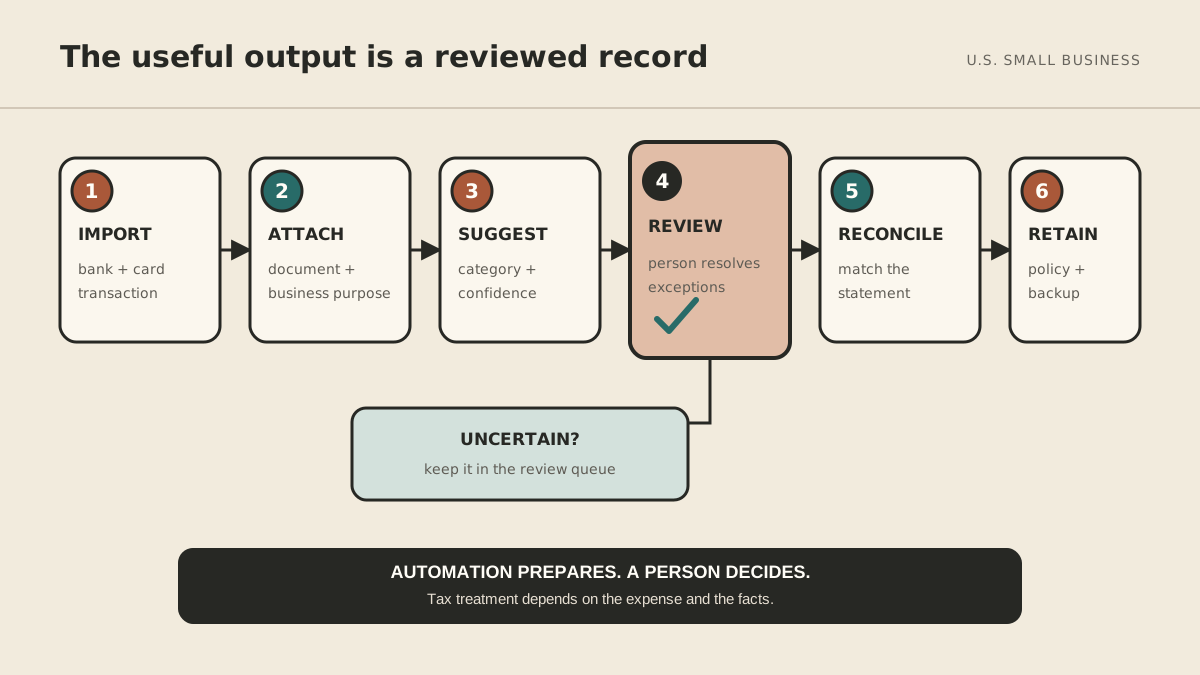
4. Suggest categories and review exceptions
Rules can handle predictable vendors. Marketplaces, travel platforms, and mixed-use services deserve more caution. For sole proprietors, the current Schedule C instructions show where common expenses are reported. The form does not decide whether a cost is ordinary and necessary or whether a special rule applies.
| Result | What the system does |
|---|---|
| Known recurring item | Suggest the established category and show the rule used |
| Plausible but uncertain | Suggest a category and add the item to the review queue |
| Personal, mixed, large, or unusual | Make no tax decision; require review |
Keep the original description, suggestion, final decision, and reviewer so a bad rule is easy to trace.
5. Reconcile every account
Each month, compare the ledger with the bank or card statement. Reconciliation asks: Did the books capture what the financial institution says happened?
Investigate missing entries, uncleared items, duplicates, mismatched refunds, transfers recorded as income or expense, orphaned receipts, and imported charges with no context. Automation can assemble the exception list; a person should clear it.
6. Review the monthly picture
After reconciliation, ask:
- Which categories changed materially?
- Are there subscriptions you no longer use?
- Did a vendor charge more than expected?
- Are reimbursements or incomplete records outstanding?
The subscription-creep checklist helps with recurring charges, while the invoice-automation guide applies the same discipline to money coming in.
7. Retain records under a written policy
Keep records long enough to support a return and meet payroll, insurance, contract, or regulatory requirements. There is no single period for every document; Publication 583 explains that it depends on the record and tax situation.
Document the authoritative system, naming and matching method, edit permissions, backup frequency, retention rule by record type, and who approves disposal. Do not let an automation delete records without a reviewed policy.
A one-afternoon setup checklist
- Choose the system that will hold the authoritative ledger.
- Connect one business bank account and one card.
- Create a receipt-forwarding address or capture shortcut.
- Add a few recurring vendors you understand well.
- Route transfers, refunds, mixed purchases, and unknown merchants to review.
- Require business purpose for travel, meals, gifts, and vehicle expenses when applicable.
- Schedule a monthly reconciliation.
- Save a report for unmatched and incomplete records.
- Test an export.
- Ask your bookkeeper or tax professional to review the categories and retention policy.
Review the first month closely. Narrow the queue only after you know which rules are dependable.
Where an assistant fits
An assistant can chase a missing document, collect business purpose, maintain the monthly checklist, or summarize exceptions. The approval-boundaries guide keeps actions involving money, records, and communication under explicit control.
MyAgnts can help with that coordination. It is not accounting software and should not decide whether an expense is deductible. Source records stay in your financial system; decisions stay with you and the professionals who advise you.
Make exceptions the work
A good system captures routine items and gives you a short list of what still needs judgment. Start with one account, one receipt route, and one monthly reconciliation. Add rules only after that loop works.