Productivity
How to Stop Context Switching at Work
Reduce context switching at work with a practical system for triaging interruptions, batching shallow work, and returning to focus faster.
To stop context switching at work, reduce how often other people and apps choose your next task. Put messages and small admin into fixed windows, define what may interrupt you, and leave a short restart note whenever you must switch. The goal is not a silent day. It is a day in which most switches are deliberate.
That distinction matters. Moving from research to writing at a planned stopping point is ordinary work. Opening chat halfway through a difficult paragraph because a badge appeared is an interruption. Both involve a new context; only one lets you choose the cost.
Why context switching feels so tiring
Before you can continue a half-finished task, you have to reconstruct it: what you were trying to decide, which source mattered, what was already ruled out, and what came next. That reconstruction is the hidden work behind a “quick check.”
A widely repeated statistic says every interruption costs 23 minutes. The UC Irvine study often linked to that claim does not report a 23-minute return-to-task average. It was a controlled experiment in which interrupted participants finished the assigned task faster but reported more stress, frustration, workload, effort, and time pressure. The useful conclusion is not a universal time penalty; it is that interruptions change both how people work and how the work feels.
Laboratory research reaches the same broad conclusion from another angle. The American Psychological Association's overview of switching costs explains that even small mental delays accumulate when people switch repeatedly, especially during complex work.
Start with a one-day switch audit
Do not redesign your calendar from a hunch. For one normal workday, make a mark each time you leave the task you intended to do. Add one letter beside it:
- P — planned: the focus block ended or you reached a natural handoff;
- E — external: a call, message, request, or alert pulled you away;
- I — internal: boredom, uncertainty, or a stray thought sent you elsewhere.
At the end of the day, look for the largest avoidable group. Ten email checks need a batching rule. Three urgent client calls need an escalation route. Six self-initiated tab changes may mean the current task is vague or too large.
The audit is more useful than a screen-time total because it shows why the switches happened.
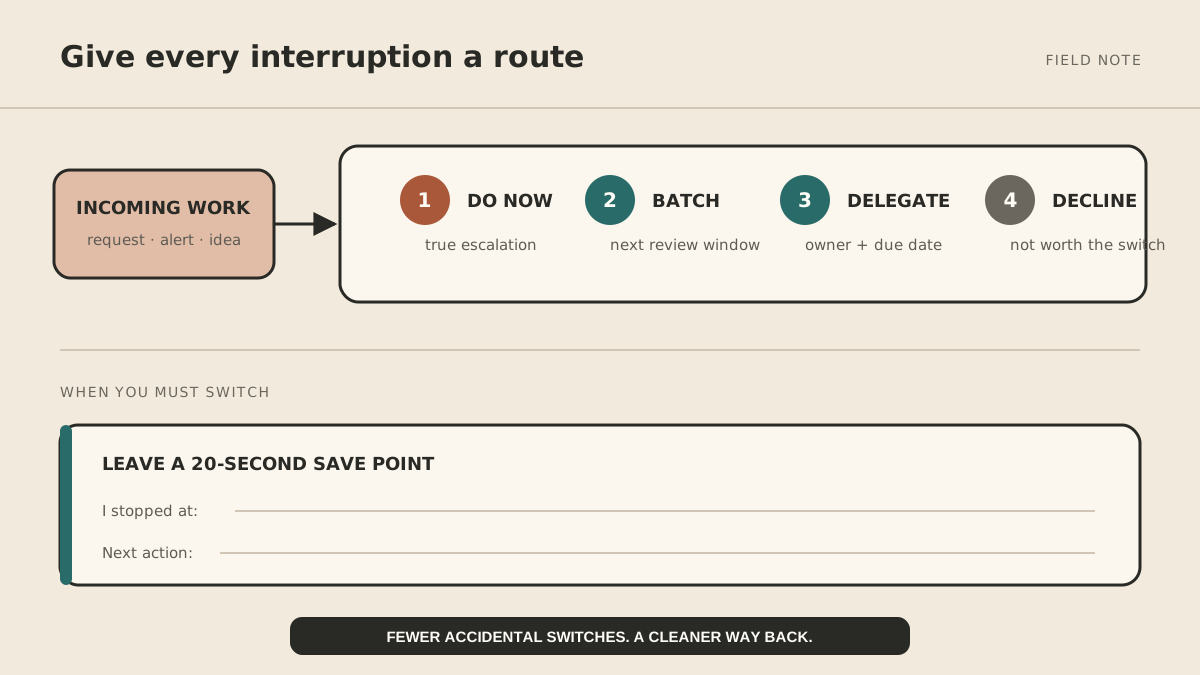
How to stop task switching during the day
1. Define what is allowed to interrupt you
“Urgent” is not a usable rule. Write one that another person could follow. For example:
Interrupt me for a customer outage, a payment failure affecting today's work, or a decision blocking someone for more than two hours. Everything else goes into the 11:30 or 4:00 review.
Your list will be different. What matters is separating a real escalation from a request that arrived recently.
2. Batch work by context, not just by size
Put tasks that use the same tools and mental mode together. Process invoices in one block. Review approvals together. Return routine calls consecutively. Two 25-minute admin windows usually create less disruption than twenty small visits to five different apps.
Batching is not postponing people indefinitely. It replaces instant response with a predictable response. Tell collaborators when you check each channel so silence does not look like neglect.
3. Make the current task easy to resume
When a switch is unavoidable, take 20 seconds to write:
I stopped at: comparing the two pricing options.
Next action: verify the annual limit in the vendor documentation.
Leave the relevant document or tab open beside the note. This tiny “save point” prevents the next session from becoming an archaeological dig. It also works at the end of the day.
4. Remove visible invitations
During focus work, keep only the tools required for that work on screen. Hide badges, pause nonessential notifications, and close the inbox rather than trusting yourself not to look at it. If colleagues need a fast route, keep one agreed escalation channel instead of leaving every channel open.
5. Protect one outcome-sized block
“Work on strategy” is too vague to defend. “Draft the three pricing options and recommend one” has a finish line. Give that outcome 45–90 minutes, depending on the work, and stop at a natural checkpoint. A clear outcome reduces internal switching because you know what “done for now” means.
Decide where recurring interruptions should go
Some interruptions are legitimate jobs: checking a public page for a change, preparing a recurring brief, collecting status updates, or drafting a follow-up. First ask whether a simple rule, scheduled report, or existing product feature can handle them.
For cross-tool work, a managed operator can prepare the result and surface only the exception that needs a decision. MyAgnts builds those workflows with explicit access and approval boundaries; it should not independently send sensitive messages or change consequential records just to preserve focus. The approval-boundaries guide shows how to separate preparation from action.
Use a seven-day scorecard
For one week, track only four numbers:
| Measure | What to count |
|---|---|
| Accidental switches | External and internal switches you did not plan |
| Protected blocks completed | Blocks that reached their stated outcome |
| Restart notes used | Unavoidable switches with a useful save point |
| After-hours catch-up | Minutes spent recovering work that slipped |
Do not aim for zero switches. Aim for fewer accidental switches and less recovery work. If the count is not improving, change the system: tighten the interruption rule, move a batch window, clarify outcomes, or remove one noisy channel.
Frequently asked questions
Is context switching the same as multitasking?
For demanding knowledge work, “multitasking” is usually rapid switching. Simple activities can overlap, but two tasks that both require judgment compete for attention.
What if my job requires constant responsiveness?
Create an on-call rotation, office hours, or a single escalation channel. If you alone must respond, work in shorter focus blocks and use restart notes. Responsiveness can be designed; it does not have to mean monitoring everything continuously.
What should I change first?
Run the one-day audit. Then fix the biggest repeated source rather than installing a new productivity system. One reliable message window often helps more than a complicated stack of focus tools.
Context switching is partly a personal habit, but mostly an operating-design problem. If recurring coordination keeps breaking the work that needs your judgment, book a MyAgnts setup call. No task prep is required; we will learn where the interruptions come from and map what can be batched, prepared, or escalated.