Field Guides
Anatomy of a Safe Client Follow-Up Agent
Design a follow-up workflow with explicit lead states, approval boundaries, duplicate and retry rules, opt-out handling, human handoff, and an audit trail.
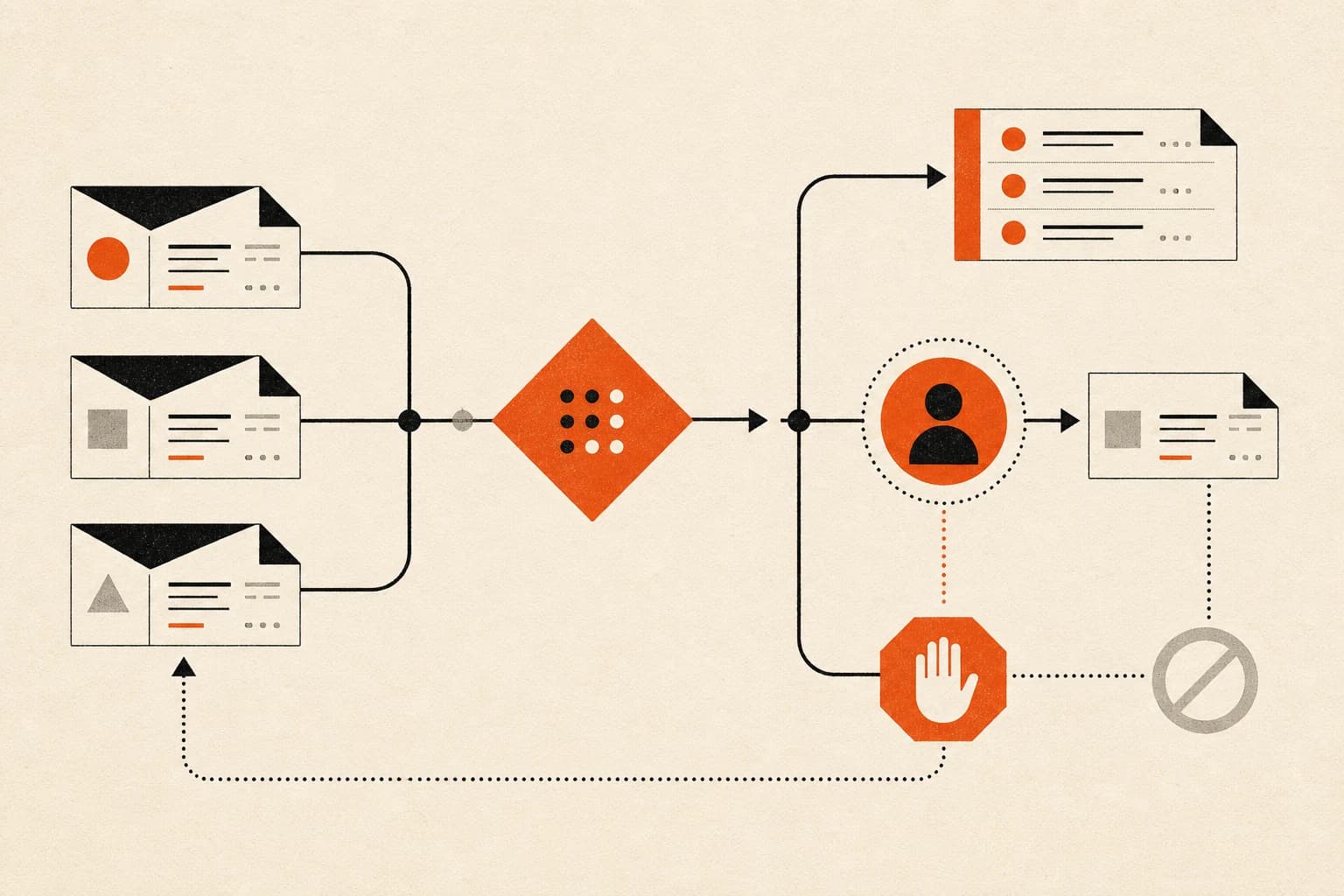
A follow-up agent is not merely a message writer. It is a small operating system around a client record: it notices a trigger, checks the current state, decides whether to act or ask, prepares the appropriate next step, records what happened, and stops when a boundary applies.
The quality of that system depends less on clever copy than on the paths around the copy. Duplicate records, retries, prior replies, missing consent, sensitive topics, and ambiguous ownership are where a simple demo becomes a real business workflow.
This guide shows how to map those paths before connecting an agent to live communication.
Scope note: This is operational, not legal, guidance. Messaging obligations depend on channel, message purpose, recipient, consent, and jurisdiction. Review your workflow with qualified counsel. For U.S. commercial email, consult the FTC’s current CAN-SPAM compliance guide. For automated calls or texts, start with the FCC’s current consent-revocation order and related guidance.
Start with the trigger
A trigger is a specific event, not a general desire to “follow up better.” Examples include:
- a new inquiry enters a designated form;
- a proposal is sent and its review date arrives;
- a client requests information that requires a prepared response;
- a meeting ends with a recorded next action.
Define the source of truth for the trigger. If both an inbox and a CRM can create the same event, the workflow needs an identity rule to prevent parallel runs.
For the first version, prefer triggers that are explicit and inspectable. A structured form submission is easier to validate than an inferred signal gathered from several loosely connected messages.
Model the lead state before writing copy
The agent should read a lead state that captures what matters for the next decision. The exact fields vary, but a useful state model can include:
- record identifier and contact identifier;
- trigger type and timestamp;
- relationship status: new inquiry, active opportunity, current client, past client, or unknown;
- most recent inbound and outbound contact;
- assigned human owner;
- channel eligibility or consent status where applicable;
- suppression or opt-out status;
- next action and due date;
- open exception or handoff status.
Do not infer an unknown state as permission. “No opt-out recorded” is not necessarily the same as “eligible for this message on this channel.” The business must define the policy and evidence required.
A hypothetical record
The following is an example, not a customer record:
| Field | Example value |
|---|---|
| Record | Demo inquiry A-104 |
| Trigger | Website consultation request |
| Relationship | New inquiry |
| Last inbound | Asked about availability |
| Owner | Operations lead |
| Channel | |
| Eligibility | Requires policy check |
| Duplicate key | Normalized email plus open inquiry |
| Next action | Prepare acknowledgment draft |
The unresolved eligibility field means the workflow cannot send. It can gather context and prepare a draft, but it must route the decision to the owner.
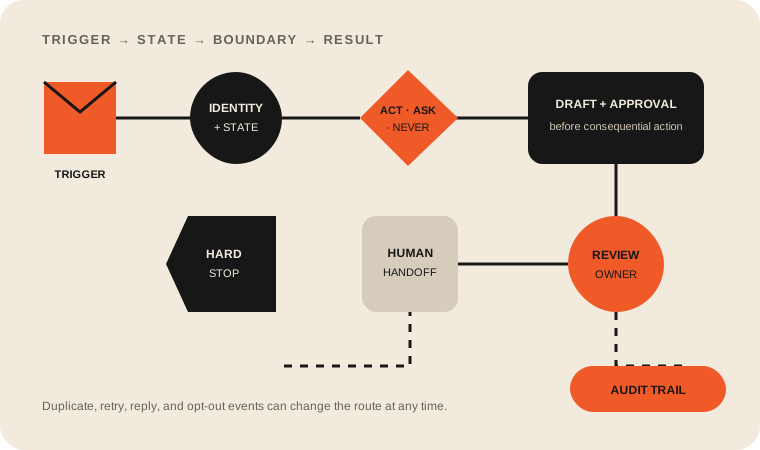
Define act, ask, and never boundaries
Separate capabilities that look similar in a demo but carry different consequences.
| Boundary | Example in a follow-up workflow | Required evidence |
|---|---|---|
| Act | Create an internal task from a complete, eligible inquiry. | Valid record, no duplicate, known owner, policy allows it. |
| Ask | Prepare a reply draft when eligibility, wording, or commitment needs review. | Draft plus source context and named approver. |
| Never | Message a suppressed contact, invent a price or deadline, or bypass the assigned owner. | A hard stop recorded in the audit trail. |
Keep the boundaries in versioned operating documentation. If a new message category is added, it should not inherit send permission merely because another category has it.
Duplicate handling
Duplicate handling begins with an idempotency rule: the same business event should not create multiple independent actions.
Choose a durable event identifier when the source provides one. Otherwise, define a conservative composite key, such as the normalized contact address, trigger type, source record, and a bounded event window. The key is a detection aid, not proof that two people are the same.
When a possible duplicate appears:
- pause the new run;
- link the candidate records;
- show the most recent actions and owners;
- ask a human when the merge would change communication history;
- record the resolution so the same pair is not repeatedly rediscovered.
Never solve duplicates by silently discarding the newer record. It may contain updated consent, ownership, or context.
Retry handling
A retry is not a new business decision. It is another attempt to complete the same approved action.
Give each action an idempotency key and a status such as queued, attempted, confirmed, failed, uncertain, or canceled. If the provider times out after submission, treat the result as uncertain until delivery state can be checked. Blindly retrying can create duplicate messages.
Set a bounded retry policy for temporary technical failures. Permanent failures, policy rejections, and malformed addresses should not loop. Route them to a visible exception queue with the original context intact.
Opt-out handling
Opt-out handling is a stop path, not a copywriting detail.
The workflow should check the applicable suppression state immediately before any send, not only when the lead first enters the system. It should recognize the opt-out signals your policy and channel require, preserve the evidence, update the source of truth, cancel pending marketing follow-ups in scope, and prevent a retry from bypassing the new state.
The FTC notes that a business cannot hand off commercial email and thereby hand off its legal responsibility. That is one reason the owner should be able to inspect the suppression path and the service working on its behalf.
Do not let a model decide whether a request to stop is “polite enough.” Route ambiguous language to a human and favor restraint while it is reviewed.
Human handoff
A useful handoff gives the human a decision packet, not just an alert.
Include the trigger, current lead state, relevant conversation excerpts, the proposed next action, the boundary that caused the pause, the decision needed, and a deadline if one genuinely exists. Assign the handoff to a named owner and keep the workflow paused until the decision is recorded.
Common handoff reasons include:
- an existing client appears in a new-lead flow;
- the inquiry mentions a complaint, dispute, or sensitive circumstance;
- a requested promise is outside approved policy;
- the contact or consent state is unclear;
- two records have conflicting owners;
- the person has replied and the automated sequence should stop.
Build an audit trail people can read
The audit trail should reconstruct the operating decision without exposing unnecessary sensitive data. A compact entry can include event time, record ID, workflow version, state checked, action proposed, boundary applied, reviewer, result, and provider reference.
Here is a hypothetical sample audit trail:
| Event | Decision | Evidence | Result |
|---|---|---|---|
| Inquiry received | Evaluate | Source event demo-104 | Record opened |
| Identity check | Pause | Possible match to demo-082 | Human review requested |
| Owner review | Continue as existing opportunity | CRM history inspected | Lead state corrected |
| Message step | Ask | Existing opportunity requires review | Draft created, not sent |
| Reviewer action | Reject draft | Prospect already replied | Sequence closed |
This is a demonstration of structure. It does not represent a production outcome or customer result.
Measurement checklist
Measure whether the workflow is controlled and useful before measuring whether it is fast.
- Are eligible triggers entering the workflow once?
- Are duplicate candidates caught before action?
- Are opt-outs and replies stopping the appropriate pending steps?
- Are retry outcomes distinguishable from new sends?
- Are human handoffs assigned and resolved?
- Can reviewers trace every proposed or completed action to its source?
- Are recurring corrections becoming documented rules or scope changes?
- Is the business outcome visible, such as fewer untouched eligible inquiries or a clearer exception queue?
Record a baseline before claiming improvement. If the old workflow did not track untouched inquiries or response state, the first useful result may be better visibility rather than a performance claim.
Test the stop paths first
Before a live launch, run historical or synthetic cases for:
- duplicate submissions;
- a reply arriving while a follow-up is queued;
- an opt-out arriving before a retry;
- an unknown owner;
- an uncertain provider response;
- a sensitive or out-of-scope request;
- a malformed destination;
- a record that should never enter the sequence.
Keep the system in draft-only mode until reviewers agree that both normal and should-stop cases behave correctly. Then introduce a narrow live slice with ongoing review.
The durable design principle
A responsible follow-up workflow earns trust by making non-action visible. A stopped message, an escalated record, or a canceled retry can be a correct result.
If you want help designing one bounded lead workflow, see our AI lead follow-up agent service page. We start with your actual trigger, states, permissions, and review owner before deciding which steps should run automatically.