Guides
How to Get More Google Reviews: A Policy-Safe System
Learn how to get more Google reviews with a repeatable, policy-safe process, including timing guidance, request templates, tracking, and automation.

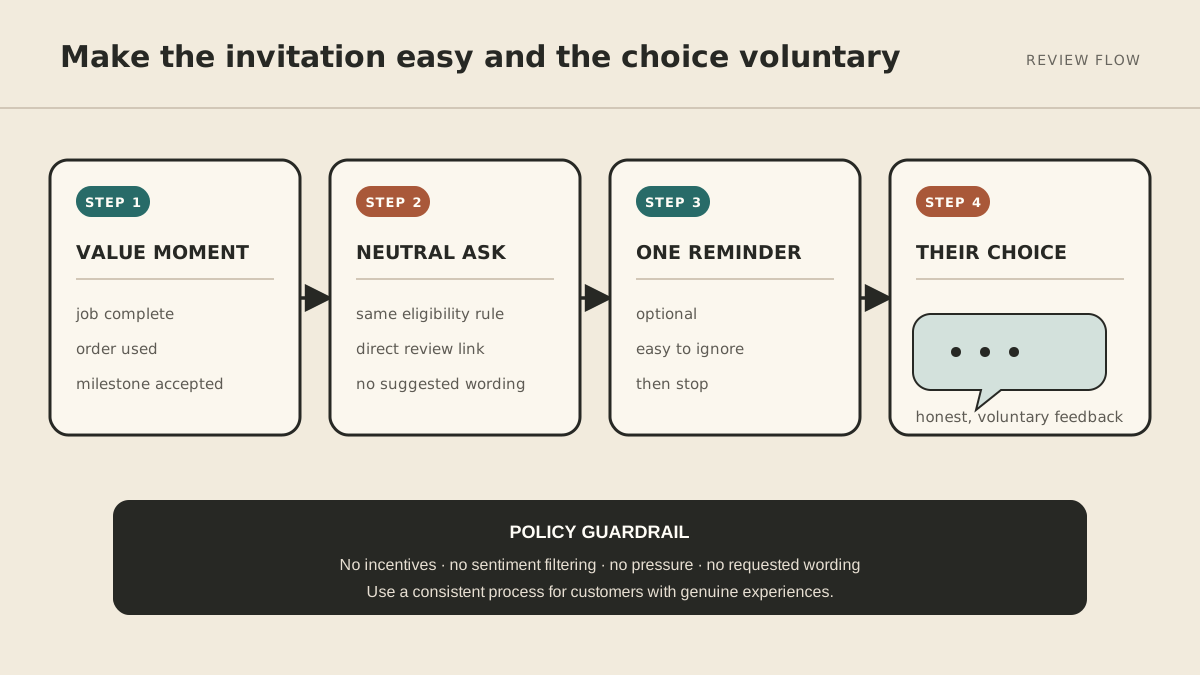
If you want to know how to get more Google reviews, build a process instead of searching for a perfect script. Ask customers with genuine experiences, use the same neutral approach consistently, send the request after the value is clear, and make the review link easy to open.
The system can be simple: one trigger, one approved message, one direct link, and—if it fits your customer relationship—one polite reminder. What matters is that the process runs reliably without screening for positive sentiment or trying to influence what customers say.
The short version: a five-step review system
- Create your official Google review link or QR code.
- Choose the moment when each eligible customer will receive the request.
- Write one neutral message for that channel.
- Track sends, reminders, and opt-outs in one place.
- Review the process monthly and reply thoughtfully to published reviews.
You can set up the manual version in an hour. Automate it only after the manual workflow feels respectful and predictable.
Follow Google's review policy
Google allows businesses to invite customers to describe genuine experiences. The guardrail is neutrality: do not reward a review, pressure someone, or try to shape the rating or content.
Google's current Maps user-contributed content policy prohibits:
- Offering payment, discounts, free goods, or other incentives in exchange for reviews
- Discouraging negative reviews or selectively asking only customers expected to be positive
- Requiring or pressuring customers to review while they are on the premises
- Asking for specific content, including a staff member's name
- Asking staff to solicit a set number of reviews
Google explicitly permits businesses to encourage genuine reviews when they do not offer incentives or attempt to influence the rating or wording. That is the standard to design around.
This means no “How was your experience?” survey that routes happy customers to Google and everyone else to a private form. That practice is commonly called review gating. It also means no “Leave a five-star review for 10% off,” no employee contests, and no message that tells customers which details to mention.
Create the shortest path to the review form
Google provides an official review link and QR code for eligible Business Profiles. Its review-link instructions say to open your Business Profile on a computer, choose Read reviews, then Get more reviews. From there you can copy the link or save the QR code.
Test the link in a private browser window and on a phone before using it. Confirm that it opens the correct location, especially if you manage several Business Profiles.
Use the link where it matches the customer journey:
- A text or WhatsApp message after a completed service
- A thank-you email after delivery
- A post-project email after an accepted milestone
- A printed QR code on a receipt or take-home card
A QR code can make the form easier to reach, but do not turn it into an on-site demand. Customers should have space to decide whether and when to respond.
Ask after the customer has experienced the value
The right moment depends on the business. “Immediately” is not always correct.
| Business type | Useful trigger | Why |
|---|---|---|
| Home or local service | Job marked complete | The result is visible and the visit is fresh |
| Restaurant or hospitality | After the visit | The full experience has ended |
| E-commerce | A few days after confirmed delivery | The customer has had time to use the product |
| Consultant or agency | Milestone accepted or outcome delivered | The request follows a clear result |
| Subscription service | After a resolved issue or meaningful success | Tenure alone is not proof of value |
Avoid sending a request in the middle of a problem, before delivery, or while a customer is still waiting for the result. If the trigger does not indicate a genuine completed experience, choose a better one.
Use a neutral Google review request
The message should sound like your business, not a reputation-management campaign. Keep it specific enough to feel personal and neutral enough that every eligible customer can receive it.
Text message template
Hi [Name]—thanks for choosing [Business] for [service/order]. If you'd like to share feedback about your experience, here's our Google review link: [link]
Email template
Subject: Share feedback about your experience with [Business]
Hi [Name],
Thank you for trusting us with [service/order]. If you'd like to share an honest review of your experience, you can do that here: [link]
We read the feedback and use it to improve.
—[Name]
Do not add “five-star,” “positive,” or suggested talking points. Do not imply that the customer owes you a review.
Decide whether to send one reminder
One reminder can be reasonable when customers commonly overlook the first message and your relationship supports a follow-up. Treat it as an operating choice, not a Google requirement.
Send it several days later, keep it shorter than the first request, and make it easy to ignore:
Hi [Name]—one quick follow-up in case the earlier link got buried. If you'd like to share feedback about your experience with [Business], here's the Google review link: [link]. No need to respond to this message.
Then stop. Do not create a sequence of repeated nudges.
Track the process without tracking sentiment
A lightweight spreadsheet or CRM view is enough. Use fields such as:
Customer · Experience completed · Request eligible · Request sent · Reminder due · Reminder sent · Opted out · Notes
You do not need a “happy or unhappy” field to decide who gets the Google link. In fact, using predicted sentiment to selectively solicit positive reviews is exactly what the policy prohibits.
You also may not know which customer posted a review. People can use different names, and pressuring them to identify themselves undermines the voluntary nature of the request. Track the process at an aggregate level unless a customer chooses to tell you they responded.
Automate review requests without automating bad behavior
Automation is useful when it makes a sound process consistent. It is harmful when it scales pressure, gating, or duplicate messages.
Before turning on a workflow, verify that it:
- Uses an objective completion trigger, not a satisfaction score
- Sends the same neutral invitation to every eligible customer
- Uses the correct link for the customer's location
- Caps the sequence at the approved number of messages
- Honors opt-outs and channel preferences
- Prevents duplicate requests for the same experience
- Keeps an audit trail of what was sent and when
- Requires approval before anyone changes the template or audience rule
An automation tool or private agent can watch for the completion event, prepare or send the approved message, schedule the optional reminder, and maintain the log. If you use an AI agent, keep its authority narrow: it should follow the approved workflow, not invent persuasion tactics or decide who “deserves” the link. See our framework for AI agent approval boundaries.
Measure the process, not just the rating
Review growth is a lagging result. Track the workflow that creates the opportunity:
- Eligible customer experiences
- Requests sent
- Delivery or bounce rate
- Reminder rate
- Opt-out or complaint rate
- New reviews during the same period
- Median age of your recent reviews
Do not promise a precise conversion rate. Results vary by relationship, channel, timing, and customer base. Establish your own baseline, change one part of the process at a time, and watch for both review growth and signs that the outreach feels intrusive.
Reply to the reviews you receive
Getting the review is not the end of the job. Google's review best-practices guide recommends valuing honest, balanced feedback and responding professionally. A useful response acknowledges something specific, stays concise, and avoids turning the reply into an advertisement.
For a critical review:
- Do not argue in public.
- Acknowledge the experience.
- Correct factual details calmly if necessary.
- Move account-specific resolution to a private channel.
- Explain a concrete improvement when you can.
Google says local results are mainly based on relevance, distance, and prominence. Its local ranking guidance notes that more reviews and positive ratings can help local ranking, but reviews are only one part of a complete, accurate, active Business Profile.
Common reasons a review process stalls
The request goes out too early
Move the trigger to a moment when the customer has actually received the outcome.
Staff remember only when a customer is delighted
Connect the request to an objective status such as “job complete” or “order delivered,” not a judgment about mood.
The link opens the wrong location
Store a separate verified link for each Business Profile and test it regularly.
Customers receive duplicate requests
Use one source of truth for send history. Make the workflow idempotent so the same completion event cannot start two sequences.
The message sounds transactional
Remove hype, rewards, rating language, urgency, and suggested content. A review request should feel optional because it is.
Frequently asked questions
Is it okay to ask customers for Google reviews?
Yes. Google permits businesses to encourage reviews that represent genuine experiences, provided they do not offer incentives or try to influence the rating or content.
Can I offer a discount for a Google review?
No. Google's policy treats payment, discounts, free goods, and other benefits offered in exchange for a review as prohibited incentive-driven content.
Can I ask only satisfied customers?
No. Google's policy prohibits selectively soliciting positive reviews and discouraging negative ones. Use a neutral, consistent eligibility rule based on a real customer experience.
How often should I ask for a review?
Ask once per meaningful, completed experience. If a reminder fits your relationship, send one polite follow-up and stop. Avoid repeated requests, duplicates, and pressure.
Can I ask customers to mention a staff member or service?
Do not request specific content. Google specifically prohibits requests that tell customers what to include, including content that identifies a staff member.
Make the process boring and reliable
The strongest review system is not clever. It sends a neutral message after a genuine experience, uses the right link, respects the customer's choice, and runs consistently when your team gets busy.
If you want to turn that workflow into a managed automation, see how MyAgnts works. Start with the policy-safe manual process first. Automation should preserve good judgment, not replace it.