Guides
How to Automate Client Onboarding
Automate client onboarding with a practical four-stage workflow, trigger map, checklist, and clear handoffs for work that still needs a person.

To automate client onboarding, start with one documented path from “client accepted” to “ready to deliver.” Give every repeatable step a trigger, action, owner, deadline, and exception route. Automate the predictable handoffs—welcome messages, forms, reminders, folders, and scheduling—while keeping scope, money, access, and unusual requests under human review.
Do not begin by connecting apps. A fast automation built on an unclear process simply delivers confusion sooner.
Map the client onboarding process first
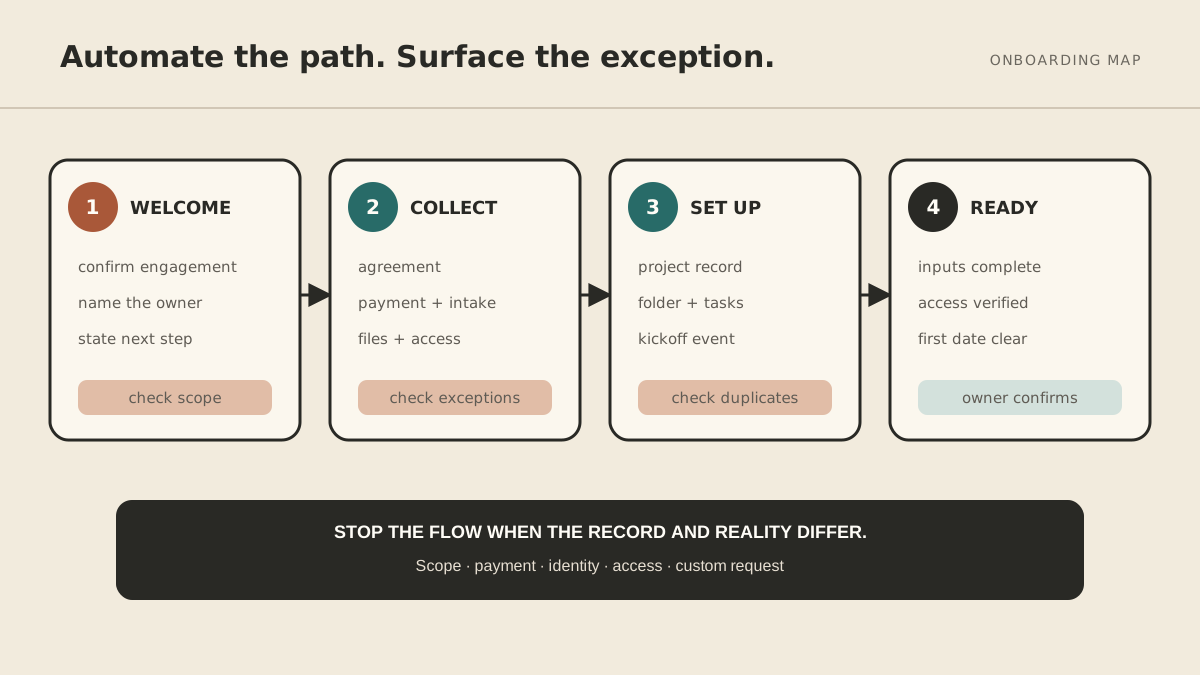
Take the last three clients you onboarded and write down what actually happened, including the chasing and corrections. Then build the default path in four stages.
1. Welcome
Confirm the engagement, introduce the day-to-day contact, explain the next step, and state when the client will hear from you again. The send can be automatic; the promise must be accurate.
2. Collect
Gather the signed agreement, payment, intake answers, files, and access required to begin. Ask only for what is needed at this stage. A 35-field form creates its own follow-up problem.
3. Set up
Create the project record, internal folder, task template, billing record, and kickoff event. Use a consistent naming convention so automation does not create a second organization problem.
4. Confirm readiness
Check that required inputs arrived, the right people have access, and both sides know the first delivery date. Onboarding is complete when work can start safely—not when an email sequence reaches its final step.
Build a trigger-action-owner map
For each step, fill in five fields:
| Trigger | Action | Owner | Due | Exception |
|---|---|---|---|---|
| Agreement signed | Send welcome and intake link | Automation | Immediately | Stop if scope or signer differs |
| Intake incomplete | Send reminder | Automation | After 2 business days | Route question or accessibility need to owner |
| Payment confirmed | Create project folder and task template | Automation | Same day | Do not create duplicates |
| Required inputs complete | Offer kickoff times | Automation | Same day | Owner reviews unusual availability |
| Kickoff booked | Send agenda and preparation list | Automation | Immediately | Owner approves custom agenda |
This map is the real specification. It tells a no-code tool, a developer, or a managed operator what “automate onboarding” is supposed to mean.
What to automate first
Start with reminders
Missing forms and files create repeated manual checking. Send one polite reminder after a defined interval, then route the item to a person instead of creating an endless sequence.
Add internal setup
Folder creation, task templates, standard project records, and internal notifications are usually low-risk because they are reversible and do not make a new promise to the client.
Connect scheduling
Offer a booking link only after prerequisites are complete. Otherwise a client can book a kickoff before you have the access or information required to make it useful.
Automate external messages last
Begin with approved templates and narrow variables. Test names, time zones, dates, links, and sender identity. Keep custom scope, pricing, contract language, and emotionally sensitive replies behind review.
Copy this client onboarding checklist
Before launch
- Define the exact event that starts onboarding.
- Name one owner for exceptions.
- List required inputs and remove nice-to-have questions.
- Write approved welcome and reminder templates.
- Choose the system of record for client status.
- Define “ready to deliver.”
For every client
- Agreement and payment status verified.
- Welcome sent from the expected identity.
- Intake link tested.
- Required files and access received.
- Internal project space created once.
- Kickoff booked in the correct time zone.
- First delivery date confirmed.
- Outstanding exception has an owner.
Make exceptions part of the design
Real clients do not move through perfect funnels. They reply with a question instead of completing the form. They have a procurement process. They cannot grant the access you requested. They sign for a different legal entity.
For every automated step, define what stops the flow. Good stop conditions include:
- identity, scope, or price differs from the approved record;
- required payment is missing or disputed;
- credentials or sensitive data arrive in an unsafe place;
- the client requests a legal, tax, or contractual interpretation;
- the same record appears to have been created already;
- the client asks for a person.
Automation should make ordinary work boring and exceptions obvious.
Test with one client before scaling
Run the workflow in draft mode. Use a test contact, follow every link on mobile, and deliberately create failures: leave a form incomplete, use a different time zone, submit the same trigger twice, and reply with an unexpected question.
Then onboard one real client with a person watching the entire flow. Record corrections in the trigger map before enabling the next client. A workflow is not ready because the happy path ran once.
Where AI belongs in onboarding
Rules are best for deterministic steps such as “when payment is confirmed, create the standard folder.” AI can help summarize intake answers, classify a reply, or prepare a personalized draft—but its output needs boundaries and, for consequential messages, review.
MyAgnts can implement and maintain cross-tool onboarding workflows with explicit approval points. The work starts with the map above, not a promise that plain-English instructions will safely replace every integration or business decision. See the business-tool security guide before connecting client data or sending permissions.
Frequently asked questions
What should I automate first in client onboarding?
Start with one repeated bottleneck, usually intake reminders or internal project setup. Measure whether it reduces chasing without creating client confusion, then expand.
Will onboarding automation feel impersonal?
It feels impersonal when messages are generic, badly timed, or wrong. Automating a prompt, accurate handoff can make the experience more attentive because the client is not waiting for someone to remember the next step.
Do I need a developer?
Not always. Built-in product automations and no-code tools handle many linear workflows. Cross-tool permissions, complex exceptions, and ongoing maintenance may justify technical or managed help.
If your onboarding map is clear but the connections and exception handling keep becoming another project, book a MyAgnts setup call. No task prep is required; we will learn how onboarding works today and identify the tools, exceptions, and practical boundary together.